Free Pool Leak Detection Report Template
Free Pool Leak Detection Report Template for Leak Detection Professionals
You did the hard part. You showed up with your equipment, you ran the tests, and you found the leak. Now the customer is standing there looking at you — and they want to understand what they are paying for.
That moment is where a lot of pool leak detection techs lose money they already earned. If you hand someone a verbal explanation and walk away, the details blur fast. They forget what you said. They second-guess the repair cost. They ask you to explain it again over the phone three days later.
A written report stops all of that. It shows the customer what was found, where it is, and what needs to happen next — in writing, with photos, with their name at the top. It takes a few extra minutes. It is worth ten times that in saved headaches and referrals.
We built a free tool so pool leak detection professionals can create that report without fighting a Word template or paying for software built for plumbers.
What Is a Pool Leak Detection Report?
A pool leak detection report is a written document that records the results of a professional leak inspection. It tells the pool owner what was tested, what was found, where the leak is, and what the repair options are.
Unlike a verbal explanation, a written report travels. The customer can show it to a spouse, send it to a contractor, attach it to an insurance claim, or pull it up on their phone a week later. They have something real to act on instead of just a memory of what you told them in the driveway.
A report also protects you. If a question comes up about what was inspected or what was recommended, the document speaks for itself.
What Should Be in a Pool Leak Detection Report?
Every professional pool leak report should cover the same basic ground. Here is what matters and why.
Inspection Date and Technician Information
The date of the inspection and the name of the technician who performed it. This ties the document to a specific visit and establishes accountability.
Client Information
The customer's name, address, phone number, and email. This is basic job record hygiene and makes it easy to follow up later.
Leak Findings
This is the core of the report. Write down exactly what you observed. Common findings include structural cracks in the pool shell, leaking skimmers, leaking return fittings, failed light conduit seals, underground plumbing leaks, and equipment pad leaks. Be specific. The customer should be able to read this section and understand what is wrong without calling you to ask.
Inspection Photos
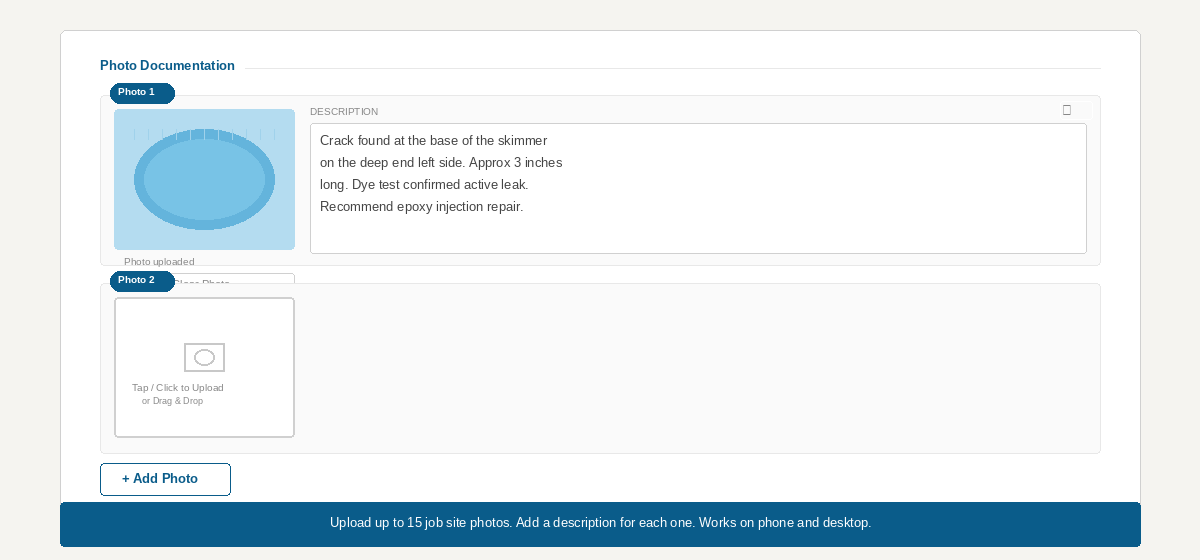
Photos do something words cannot. A customer who sees a photo of the cracked fitting or the failing skimmer throat understands the problem immediately. There is no room for "are you sure it is really leaking?" when there is a picture in the report.
Illustrated Pool Photo with Markups
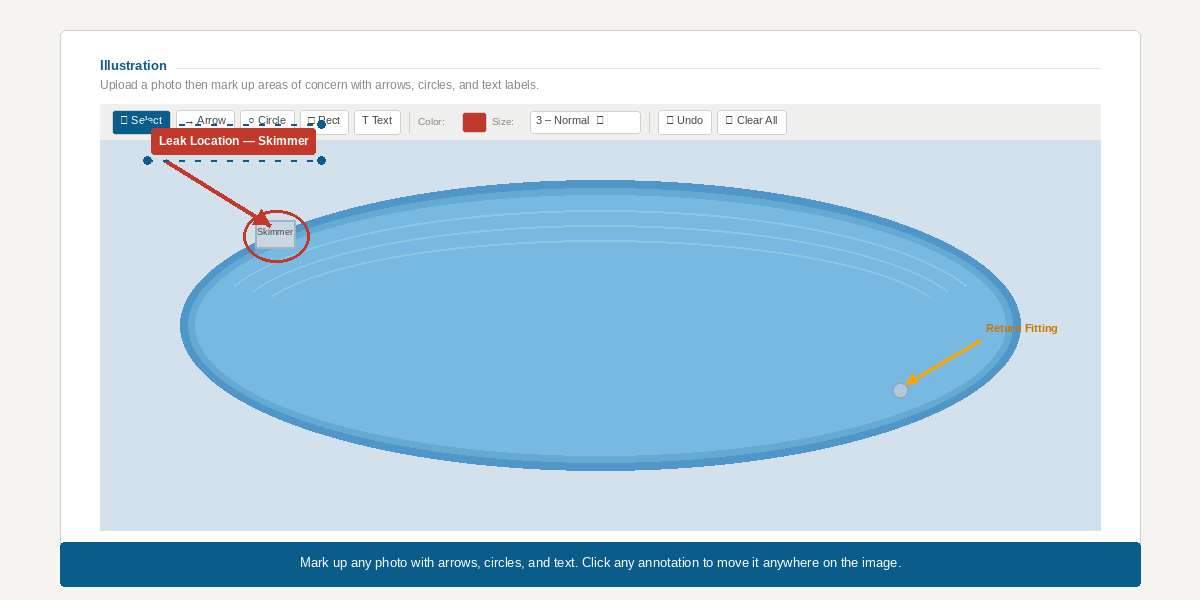
The best reports go one step further. They include a photo of the pool with arrows, circles, or text labels drawn directly on it to show exactly where the problem is. When a customer can see a red arrow pointing to the leak on a photo of their own pool, they stop asking where it is. That is a better experience for everyone.
Repair Recommendations
Close the report with what you recommend and, if applicable, an estimated cost. Crack repair, skimmer replacement, plumbing repair, light niche resealing — whatever the job calls for. Writing it down means the customer has a real number to work from and a scope they can share with the repair company. It also means your recommendation is on record.
How Does It Compare to Other Reporting Options?
A few tools exist for pool leak detection reporting. Most have trade-offs worth understanding before you commit to one.
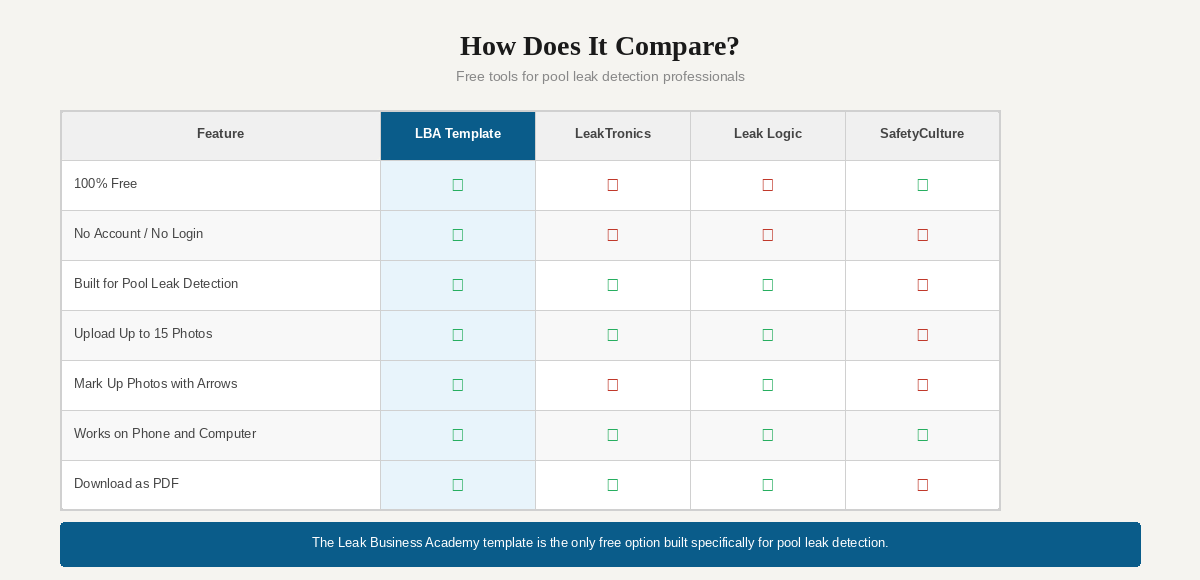
LeakTronics has a reporting app built specifically for pool and plumbing leak detection. It is well-designed and generates professional output, but it is iOS only — Android users are out — and it is only free for the first year following their training course. A paid subscription kicks in after that.
Leak Logic produces nicely formatted PDF reports and is built around pool leak detection workflows. It is a solid product, but it requires a paid account and the reports are branded to their platform, not yours.
Generic inspection templates from SafetyCulture, Jotform, and similar platforms are free and flexible, but they are built for building inspectors and property managers. The fields do not match what a pool leak detection tech actually needs, and none of them let you draw on a photo.
The Leak Business Academy template is free, requires no account, and is designed around the exact workflow of a pool leak detection inspection — not a plumber's workflow, not a home inspector's workflow.
| Feature | LBA Template | LeakTronics | Leak Logic | Generic Templates |
|---|---|---|---|---|
| Free to use | ✓ Yes | 1st year only | ✗ No | Some |
| No account required | ✓ Yes | ✗ No | ✗ No | Some |
| Works on phone and desktop | ✓ Yes | iOS only | ✓ Yes | ✓ Yes |
| Built for pool leak detection | ✓ Yes | ✓ Yes | ✓ Yes | ✗ No |
| Upload up to 15 photos | ✓ Yes | ✓ Yes | ✓ Yes | Limited |
| Mark up photos with arrows & circles | ✓ Yes | ✗ No | ✗ No | ✗ No |
| Download as branded PDF | ✓ Yes | ✓ Yes | ✓ Yes | Limited |
The photo markup feature is the one thing no other free tool offers. Being able to circle the leak and draw an arrow to it on an actual photo of the customer's pool is worth more than any written explanation.
Why Professional Reports Are Good for Your Business
When a customer receives a written report with photos and marked-up images, the dynamic of the entire conversation shifts. They are not taking your word for it anymore. They are looking at documented evidence in a document with their name on it.
That changes what happens next. Customers who understand the problem are more likely to approve the repair. They are more likely to call you back for future work. They are more likely to refer you to a neighbor when the neighbor mentions their pool is losing water.
It also shortens your workday. Every minute you spend re-explaining a finding over the phone is a minute you are not getting paid for. One PDF, sent same day, handles that conversation before it starts.
How to Use the Template
Open the tool in any browser on your phone or computer. No app download. No account. No login. Fill out the report during or right after the inspection and download the PDF before you leave the job.
Your company name, phone number, email, and logo save automatically the first time you enter them. Every report after that will already have your information at the top.
Enter your company info once — it saves for every report after that
Fill in the client name, address, and inspection date
Write up your findings in the leak findings section
Upload job photos from your phone gallery or drag them in from your computer
Use the illustration tool to mark the leak location on a pool photo
Add your repair recommendations
Hit Download PDF and send it to your customer the same day
One note: report data is not saved between browser sessions. Complete and download the report before closing the tab. Your company info is the exception — that saves automatically and stays for next time.
Frequently Asked Questions
What is a pool leak detection report?
A pool leak detection report is a written document that records the findings of a professional inspection performed to locate water loss in a swimming pool or spa. It typically includes the inspection date, leak findings, photos, and repair recommendations.
Is the template really free?
Yes. There is no subscription, no account, and no software to download. Open it in any browser and start filling it out.
Does it work on a phone?
Yes. The tool works on any phone or tablet browser. Photos can be uploaded directly from your phone's camera roll.
How many photos can I add?
Up to 15 photos. Each one has a description field so you can explain what the customer is seeing in that photo.
Can I draw on the photos?
Yes. The illustration section lets you upload any photo and draw arrows, circles, and text labels directly on it. This is one of the most useful features for showing customers exactly where a leak is located.
Can the report be downloaded as a PDF?
Yes. When the report is complete, click Download PDF. The finished report includes all your findings, photos, illustrations, and recommendations in a clean, professional layout.
Does my data save if I close the browser?
Report data does not save between sessions. Download the PDF before closing the tab. Your company name, contact info, and logo do save automatically and will be there the next time you open the tool.
Why should pool technicians provide written reports?
A written report gives the customer clear documentation of what was found and what was recommended. It reduces follow-up calls, builds trust, supports the repair process, and protects the technician if questions come up later.
If you want to learn professional leak detection methods and build a pool leak detection business from the ground up, visit Leak Business Academy for training, tools, and resources built specifically for pool leak detection professionals.